Branded Event App: The 9-Point Checklist for Higher Adoption
August 13, 2026 · Alexander · 18 minute read
Table of Contents
- The 9 Checks to Make Before Choosing a Branded Event App
- 1. Can You Reasonably Ask Your Attendees to Install an App?
- 2. How Much of the Attendee Journey Needs to Carry Your Brand?
- 3. What’s the Full Cost After Add-ons, Developer Accounts and Repeat Events?
- 4. Who Runs the Technical Side, and Do You Have an In-House Team to Help?
- 5. Can You Plan the App Several Months Before the Event?
- 6. How Quickly Can Your Team Push Urgent Changes on Event Day?
- 7. What Adoption Rate Should You Expect, and What Will You Measure?
- 8. Where Does Attendee Data Live, and What Permissions Does the App Ask For?
- 9. What Happens to the App After the Event?
- Use LineUpr When the Event, Not the App Store Listing, Needs to Be Branded
- Choose the Level of Branding Your Event Actually Needs
- FAQs
A branded event app usually means one of three purchases. Some vendors publish a white-label native app under your organisation's name in the Apple App Store and Google Play. Some place your branded event inside their own mobile app, which attendees download first. Others give you a branded web app that opens from a URL or QR code.
If you've been quoted for a white-label build for a customer day or partner conference, you need to know whether that level of ownership is what you need. Creating developer accounts, store assets and app submissions are a real commitment when customisable logo, colours and event content were your actual requirement. Apple alone charges organisations $99 per year and requires a registered legal entity and D-U-N-S Number.
Below are nine checks to compare vendors on audience fit, brand ownership, total cost, technical workload, adoption and what happens after the event.
Running a few professional events a year and want to see the attendee experience before you commit to anything? You can build and preview a branded event app free with LineUpr, then check the flexibility and branding is exactly what you need.
The 9 Checks to Make Before Choosing a Branded Event App
Before you compare a platform’s features, you need to decide the type of “branding” you need.
What you want | What the vendor will usually provide | What attendees do | What to check |
Your logo, colours and event content inside an existing mobile app | Your event appears inside the vendor’s app | Download the vendor’s app, then find your event | Attendees may still see and download the vendor’s app before finding your event |
A branded event that opens from your invitation, event page or QR code | A web-based event app with your branding | Scan a QR code or open an invite link | You won’t receive a standalone App Store or Google Play listing |
Your organisation’s own app name, icon and app-store listing | A white-label native app published under your organisation’s identity | Download your organisation’s app from an app store | It may require developer accounts, additional setup, store assets and a higher fee |
Features designed specifically around your organisation’s workflow | A custom app built by a mobile app dev team | Download your self-built app from an app store | You’ll be responsible for a software project, including testing, maintenance and future updates |
The agenda, speaker pages, sponsor content and polls may look similar across these options. What changes is how attendees access the event app, whether the access path carries your branding, and the cost of running the app in terms of setup time and money.
Here’s the checklist:
1. Can You Reasonably Ask Your Attendees to Install an App?
Whether attendees will install an app depends on how much they get back for the effort. Employees joining a recurring company programme may accept a required download, because the organisation can explain how the app will be used, distribute it through internal channels and ask IT to approve it on managed devices.
A customer, partner or distributor invited to one event has a lesser reason to install something new. Before checking the agenda, they may have to find the correct app-store listing, download it and create an account for an app they expect to use once.
A 2026 Clutch survey found that 80% of smartphone users have installed an app because it was required rather than wanted, and 72% found the experience at least mildly annoying.
The same research found that 54% of users delete an app once they’re done using it, if they use it at all, although they won’t delete it if they use it regularly. This makes a mobile app easier to justify for an annual conference, association programme or recurring event series that attendees return to.
But for a one-day customer event or partner meeting, the test is what the app does that a web app cannot do as well.
If the main jobs are checking the agenda, viewing speakers, accessing documents and joining polls, a branded web app may be enough. Attendees can open it from the invitation or a QR code while the event still carries your organisation’s logo, colours, imagery and content.
LineUpr follows this browser-based model: organisers publish the event and distribute its URL or QR code through the LineUpr event app workflow. This way, attendees won’t have to download any app, and you’ll still provide a fully-branded experience.
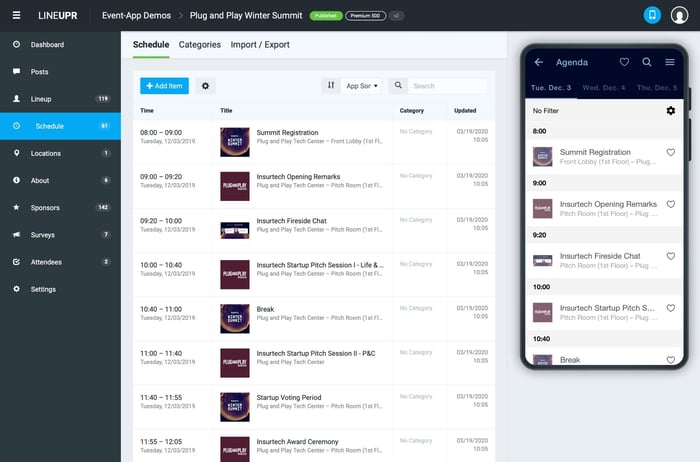
You can preview an existing event app to see what yours can look like with LineUpr.
2. How Much of the Attendee Journey Needs to Carry Your Brand?
Every branded event app platform lets you add your logo, colours and event imagery. What differs is how much of the path to your event carries that branding.
For your app, ask where attendees will still see the vendor's identity.
Before they access the event.
On the login or download screen.
In the app-store listing.
Inside the event itself.
Your app name, icon and publisher listing earn their cost when you run a recurring programme or flagship conference that attendees will regularly attend. For a one-day customer event, partner meeting or internal conference, what matters more is that guests reach your branded event without extra steps that may discourage them from using the app.
“Fully branded” isn’t useful unless the vendor explains exactly which of those surfaces your organisation controls.
LineUpr focuses on the attendee-facing experience, so you can apply your branding and share the published event through a URL or QR code. You won't get an app-store listing. This tradeoff works for B2B corporate events, where guests are often reluctant to install a supplier's app for a one-day or three-day event.
3. What’s the Full Cost After Add-ons, Developer Accounts and Repeat Events?
The platform’s fee is rarely the full cost of a branded event app.
A standard plan may include your logo and colours but they’ll charge separately for a white-label app, advanced analytics, integrations or additional support. Business of Apps puts custom app development at $5,000 to $50,000 for a simple build, and $50,000 to $120,000 at medium complexity. Maintenance adds a further 15 to 25% of the build cost every year. A vendor's white-label add-on may be somewhat cheaper than those figures, but the same principle applies: the quoted fee is the starting point, not the total.
For a white-label app, also check whether your organisation must pay for and maintain its developer accounts. The Apple developer enrolment alone requires a registered legal entity and D-U-N-S Number, which can take weeks to file and approve. Some vendors also require access to your Apple and Google developer accounts before they can publish the app under your organisation’s name.
Ask each vendor for the cost of:
The platform and white-label add-on;
Implementation or design support;
Additional attendees, events or administrators;
Developer-account fees;
Future updates and renewals;
Duplicating or rebuilding the app for the next event.
Then compare the first event with the second. A larger upfront investment may make sense if the same app will serve several events with only changes to the speaker lineup and agenda. It may be a tougher call when the app supports a few internal events a year and most of the spend goes on features and an app store presence you don’t really need.
The gap between what a branded app looks like it should cost and what an agency quotes can catch teams off guard. Michael Kimmig, Vice President at GRENKE AG's digital subsidiary, put it plainly after building their executive conference app with LineUpr: "Just try it and see how far you can come in an hour. Astoundingly, you then realize how expensive an agency wants to sell such an app."
LineUpr prices per event. You can build and preview the branded web app before paying anything, then select a package based on your event's attendee numbers and required features through the LineUpr pricing page. Prices are as low as $ 215 per event of 50 guests and $ 635 a year for four events with 200 total guests.
Check LineUpr per-event pricing to see if it’s a good fit for your events.
4. Who Runs the Technical Side, and Do You Have an In-House Team to Help?
Publishing a white-label native app under your organisation's name requires work from your team, even when the vendor builds it.
Someone has to enrol the organisation in the Apple and Google developer programmes and verify its legal details. That person also gives the vendor account access, approves the app-store description and supplies icons, screenshots and privacy information.
If a submission is rejected or an account detail is incomplete, the event manager may have to coordinate between the vendor, IT, the legal teamand whoever controls the developer account.
That’s manageable when your organisation already publishes apps or has technical support. It’s a different commitment for a small events team that expects to choose colours, upload the agenda and send attendees a link.
Before signing, ask the vendor to state clearly:
Which accounts your organisation must create;
Which assets and approvals your team must provide;
Who handles submissions and rejected reviews;
Who maintains the app after the event.
The answers let you know what your team is responsible for before committing to it.
A browser-based event app removes that chain entirely. With LineUpr, there are no developer accounts to enrol or store assets to supply, because the event is published to a URL rather than an app store.
The work that remains sits with your events team: branding, agenda, speaker pages and the attendee content. Nobody needs to involve IT, legal or whoever controls a developer account.
5. Can You Plan the App Several Months Before the Event?
A white-label app with custom requirements needs planning months before the event, and the deadline you work back from is the date attendees need access, not the event date itself.
Before the vendor can build or configure your branded event app, your team needs to agree on what the app should do. That may include registration or login, personalised agendas, attendee profiles, networking, notifications, sponsor pages, surveys and access controls.
Any integration to your existing systems is another round of configuration. If attendee details must sync from your registration platform, CRM or company database, you and the vendor need to agree on the data to move, how often it updates and what happens when records don't match.
The app then needs to be configured, populated and tested. Your team reviews prototypes, confirms the branding follows company guidelines, tests different attendee journeys and reports anything that doesn't work. The vendor makes the changes, provides another version and repeats until the app is ready.
A late request can reopen work the team thought was finished. Adding single sign-on, private schedules, a new integration or different access rules may affect the build, testing and release plan.
If attendees are expected to create profiles, schedule meetings or explore the programme in advance, the app needs to be ready several weeks before the event day.
A branded web app skips native development and the app-store release process entirely. Your team still prepares the branding, content and attendee journey, but they can configure and publish the event without sending changes back to a vendor or waiting for separate iOS and Android builds.
With LineUpr, organisers build the event through the browser, preview the attendee view and publish it, usually within an afternoon. That suits a team with an event date already set and no appetite for a mobile app project.
Sign up for free to build your event app and test the features before you pay.
6. How Quickly Can Your Team Push Urgent Changes on Event Day?
An event app can launch on time and still fail when the programme changes.
A speaker may cancel, or a session may move to another room. A session may run long and push everything after it. Find out whether your team can publish those changes directly, or whether the request goes to the vendor and then to their technical team.
Ask vendors to distinguish between content updates and app-level changes. Agenda items, speaker details, sponsor details, venue information and announcements may need immediate updates, while changes to the app name, icon or store listing follow a separate process.
For the event-day, confirm:
Which content your team can edit without support;
How quickly changes appear for attendees;
Whether users need to update or reinstall the app to see the changes;
How urgent announcements reach people who aren’t currently using the app.
These are important when the app replaces printed programmes. An attendee who has to update the app to see new information would mean the app hasn’t simplified the communication workflow and it may affect their experience.
With LineUpr, you can edit published event content through the browser. When attendees reopen the web app, they receive the updated version without installing anything. You can send push notifications to draw attention to important changes.
GRENKE AG used this at their annual international executive conference in Berlin, an event of 120 to 130 people. Their back office sent short notices during the day, including one about a talk starting five minutes late and another about a shuttle bus departure time. Michael Kimmig, Vice President at the group's digital subsidiary, said that short-term programme changes reached attendees in close to real time, which helped his team handle changes quickly across the event.
7. What Adoption Rate Should You Expect, and What Will You Measure?
Adoption is measured by what attendees do in the app, and “total downloads” tells you almost nothing about that.
An attendee may install your app and not open it. Another may open a web app from a QR code, check the agenda throughout the day and respond to every survey. The second attendee got more out of the app, and none of it registers as a download.
Before buying, decide which actions will show that the app succeeded. Depending on the event, that may include:
Attendees who opened the app;
Repeat visits during the event;
Programme items viewed or saved;
Poll, Q&A or survey participation;
Speaker, sponsor or document views.
Ask vendors what they report against and whether you can export it. A platform that evaluates installations alone won’t give insights into whether attendees read the agenda or total number of attendees that used the Q&A.
Your adoption plan needs to cover how easily attendees reach the app and what brings them back after the first open. Removing an install step helps with the first. Content that changes during the day, live surveys and event-day announcements help with the second.
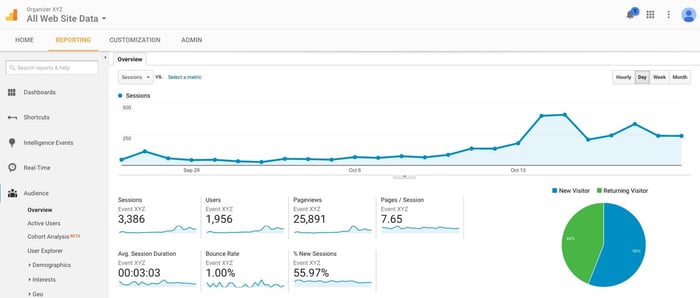
Organisers who use LineUpr can review event-app usage and connect Google Analytics or Matomo for deeper analysis, providing relevant context about attendee activity.
8. Where Does Attendee Data Live, and What Permissions Does the App Ask For?
The amount of attendee data an event app needs depends on what you ask people to do inside it.
An agenda-only app may work without personal profiles. Networking, private messaging, personalised schedules and appointment booking usually require attendees to identify themselves and may involve names, email addresses, photographs or contact details.
Before buying, confirm:
Whether attendees must create an account;
Which personal details are compulsory;
Where the data is stored;
Who can view or export it;
Which device permissions the app requests;
How long the data remains available after the event.
Don’t assume that a branded app needs access to contacts, location, photographs or other phone data simply because it’s native. Ask the vendor to connect every requested permission to a feature your event will actually use.
The access model should also match the event. An agenda-only programme can run without individual logins. A private leadership meeting may require password protection for the entire app, same as a networking event where attendees have to create profiles, login, and store personal details.
LineUpr supports those different levels of access. An information-led event app can be used without attendee login, in which case LineUpr doesn’t store users’ personal data during use. Organisers can password-protect the full app when the content is private, all of which protects your attendee data.
LineUpr hosts event-app data on servers in Germany and follows European data-protection requirements. That matters when your legal or IT team has to sign off on where attendee data is hosted.
9. What Happens to the App After the Event?
Decide how long attendees need the app after the event before you pay for a permanent app-store presence.
For a one-day customer event or partner meeting that happens a few times a year, the app may only need to remain useful long enough for attendees to access presentations, complete a survey and revisit event resources. Your team can then review the usage data and reuse the structure for another event.
A recurring conference or membership programme has a different requirement. Attendees may need the app for several events and to support communication throughout the year. In that case, a white-label native app or multi-event platform may justify the additional setup and ongoing cost.
Ask the vendor:
How long attendees can access the event after it ends;
Whether you can keep documents, recordings and surveys available;
Whether usage data remains accessible;
Whether the app can be duplicated for another event;
Whether the next event requires another payment or store submission, especially if they’re different types of events.
If you're running a few events a year, LineUpr lets organisers duplicate an existing event app rather than rebuild the agenda, branding and content structure from scratch. The next event starts from the last one, with no second store submission and no app to maintain between events.
Use LineUpr When the Event, Not the App Store Listing, Needs to Be Branded
LineUpr gives your organisation a branded attendee experience without publishing a separate native app.
It's designed for non-technical teams, so anyone can build the event through a browser and apply brand colours, logo, agenda, speakers, sponsors, documents and the interactive features the event needs. You build it on the left of your desktop and preview it on the right:
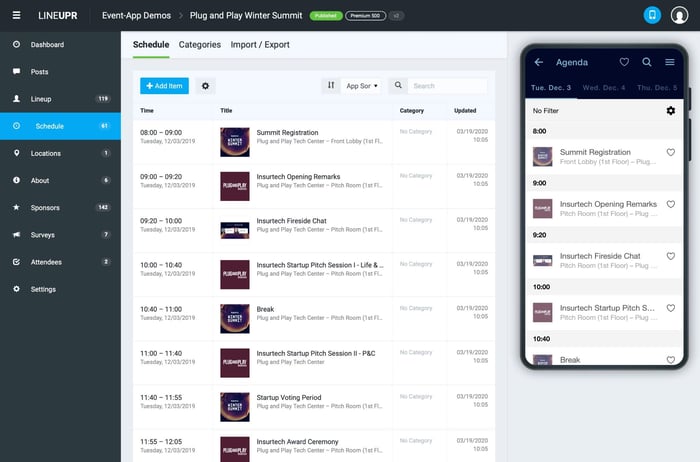
Once published, attendees can open the event from a URL or a QR code on their phone, tablet or laptop. The desktop view matches the mobile view, so remote participants can follow the same branded experience on a laptop during hybrid events.
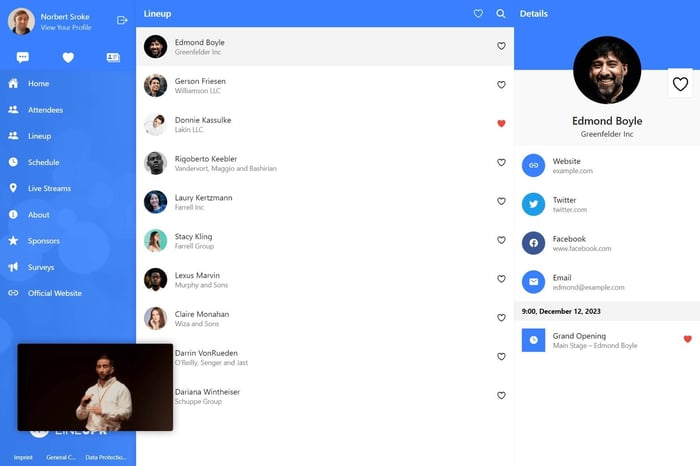
This makes LineUpr a practical fit for a small events or marketing team that:
Expects customers, partners or distributors who may not install an app for one event;
Wants to build and update the app without developers;
Already manages registration and wider event operations elsewhere.
You can also adjust the visual design, homepage content and event wording so the app matches the event's corporate identity. VOLLMER WERKE used LineUpr for this when announcing their VDays product to over 450 customers worldwide. Nicole Skoberla, their marketing consultant, said the tool let them integrate their "corporate design in just a few steps," and that visitors who used the app rated it as extremely or very helpful.
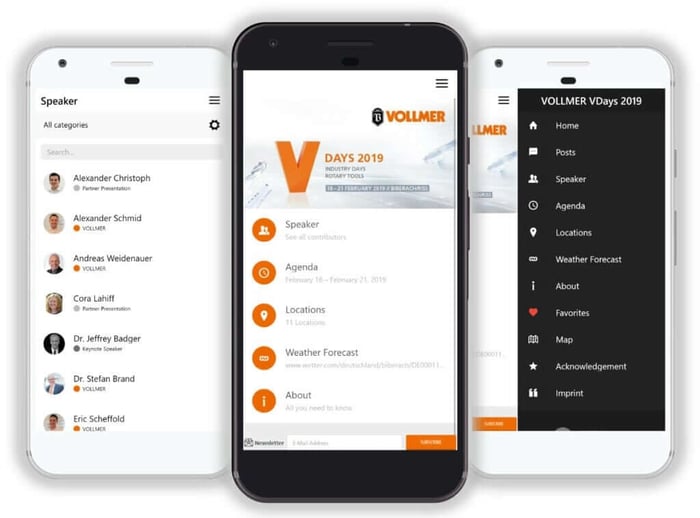
LineUpr isn't the right choice when your organisation specifically needs its own mobile app name and permanent app-store presence.
You can build and preview the app free before choosing a paid package. Sign up for free to see how it works for your events.
Choose the Level of Branding Your Event Actually Needs
A permanent app-store presence earns its cost when attendees return to the same app across a recurring conference or membership programme.
For a one-off customer event, partner meeting or internal programme, the app needs to look like the event, carry the right information and stay easy for your team to update.
Decide which of those two you're buying before you compare vendors.
Create a branded event app free and see how it works for your next event.
FAQs
Is a branded event app the same as a white-label event app?
Not always. A white-label event app usually means a mobile app published under your company's name in the App Store and Google Play, with the vendor's identity removed. A branded event app can also be an event inside a vendor's mobile app, or a web app that carries your branding without its own app-store listing.
Do attendees need to download a branded event app?
That depends on how the app is delivered. Native and white-label native apps usually require attendees to install them from an app store. A branded web app opens through a browser using a URL or QR code.
How long does it take to launch a branded event app?
A web-based event app can be published as soon as the organiser has added and approved the event content. With LineUpr, that usually takes a few hours. A white-label native launch also involves developer-account setup, design assets, store information, submission and time to resolve approval issues, which can stretch launch time from weeks to months. Ask the vendor to separate the app-store review from the work required before submission.
Can a small event team build a branded event app without developers?
Yes, when the platform provides a self-service builder. LineUpr lets organisers create, preview, publish and update a branded web app through the browser. A developer is still needed for a fully custom build or a native app with unusual technical requirements.