Event App Adoption: Why Attendees Don't Use Your App and What to Do
August 20, 2026 · Alexander · 12 minute read
Table of Contents
- Attendees Don't Use Your App for Four Reasons, and Access Friction Is the Biggest
- A Good Adoption Rate Is the Share of Attendees Who Used the App for What Your Event Needed
- To Raise Adoption, Remove the Access Steps First, Then Promote and Keep It Useful
- Measure Adoption by Separating Who Got In from Who Took Action
- The Download Barrier Still Applies, Even for Internal Events and Existing Apps
- PWA Event Apps Remove the Download Step: the Barrier You Can't Promote Past
- FAQs
You did everything right. The app link went out in the confirmation email, you repeated it in two reminders, you put a QR code on the badge, and on event day, most attendees still navigated by paper, asked staff for directions, and never opened the app you chose for them.
For most people, the first instinct is to promote harder. And while that won’t do any harm, the better question to ask is why didn't people use it after everything I already did? The reasons attendees skip an event app are more predictable than they look, and the biggest one has nothing to do with how loudly you promoted it.
Attendees Don't Use Your App for Four Reasons, and Access Friction Is the Biggest
Low adoption has three possible causes, and they are not equal. Two are real but secondary. The third sits underneath the other two and quietly caps everything, and it's the one most organisers never work on.
Most Drop Off at the Download or Login Step, Before They Ever Engage
This is the barrier that limits every other effort. An attendee saw your link or scanned your QR code and still couldn't reach the content, because getting in meant some chain of:
Searching an app store;
Downloading over weak venue wifi;
Creating an account;
Verifying an email;
Remembering a password;
Entering an event code;
Accepting permissions;
Switching between inbox, browser and app.
Picture a delegate reading your reminder email on the train in. They tap the link ready to save a couple of sessions, and land on an app-store page asking them to download. They tap through, then it wants an account, then an email verification, then a password. Somewhere around the third screen the train reaches the platform and the phone goes back in the pocket. They never saw your agenda, and now they never will.
Each step looks trivial to you. Stacked together, they're a funnel that leaks attendees at every stage, and no reminder email, extra poll or prize can recover the person who never got through it. In a 2026 Clutch survey of 476 smartphone users, 45% said they only download an app they truly need. A one- or two-day event rarely clears that bar.
A download can make sense for a multi-day conference with the audience volume to justify it; for a smaller or single-day event, that same step just costs you attendees. This is why promotion plateaus: it's fighting the download step instead of removing it.
External Guests Won't Install an App for a One-Day Event
Who your attendees are decides how much that download step costs you, and this is where it does the most damage. Attendees at an internal event may push through because it's part of their work. But external guests (customers, partners, sponsors, distributors) are far more likely to ask whether an app is worth it for a single day.
Think about a customer invited to your one-day partner event. They arrive on a work phone that only installs apps their IT team has approved, and yours isn't on the list. Even if it were, they're weighing an install against a single afternoon on-site. For them, "download our app" is an easy no.
The same Clutch research found 18% won't download at all when a browser alternative exists, and of the people who do install a required app, 80% did it reluctantly and most were annoyed. That's not the mindset you want walking into your event.
Company-managed devices make it harder still. Attendees on corporate phones often can't install anything their IT team hasn't vetted in advance, which blocks your app before adoption is even on the table.
For these audiences, the access model is the adoption strategy. The fewer steps between a link and the content, the more of your room you keep.
Some Never Learned What the App Was For
The smaller, more fixable cause: the app was introduced too late, or "download our event app" never told anyone what it was for. Think of the attendee who skimmed the email, saw a line about an app at the bottom, and had no idea it held the only up-to-date agenda. An attendee needs a concrete reason to open it. "Use the app to choose sessions, submit questions during Q&A, vote in live polls and get instant alerts about room changes" earns an open in a way "download our app here" never will. This one genuinely is a promotion fix, but it's a fraction of the problem.
Others Opened It Once and Found Nothing Worth Coming Back To
The third cause: attendees got in, saw only what was already in the confirmation email or PDF agenda, and never returned. Someone opens the app in the coffee queue, sees the same schedule they already have as a printout, and closes it for good. An app earns repeat opens by being the single most reliable place for live information and interaction: agenda changes, room updates, session resources, polls, Q&A, networking. Not every feature suits every event; the point is that the app has to become the source of truth, not a copy of the website.
Before you can fix the right one of these, though, you need to know what you're actually measuring, because "low adoption" means nothing until you define what a good rate is.
A Good Adoption Rate Is the Share of Attendees Who Used the App for What Your Event Needed
There's no universal number. A commonly cited range is 55-65%, with stronger events reaching 70% or more, but treat those as directional. The figure is close to meaningless until you tie it to the job the app had to do:
If the app replaces a printed agenda, adoption is the share of attendees who used it to check the programme, speaker details, maps or live updates.
If the app supports participation, it should include poll responses, Q&A submissions, survey completions or saved sessions.
For networking-heavy events, it should track attendees who built profiles, viewed others, exchanged messages or booked meetings.
Count Meaningful Actions; Downloads and Logins Don't Prove Use
The cleanest starting formula is:
Event app adoption rate = active app users ÷ actual event attendees × 100
"Actual attendees" means people who showed up, not everyone who registered. "Active users" means people who did something meaningful in the app. A download proves nothing about use, and a login only proves someone got as far as the first screen. Track access (getting in) and use (doing something) as two separate numbers, so you can see which one is actually failing.
To Raise Adoption, Remove the Access Steps First, Then Promote and Keep It Useful
Once you know friction is the real barrier, the fix has an order. Remove the access steps first, then use promotion and content to earn opens on top of a low-friction app, instead of asking them to make up for a high-friction one.
Start by picturing the shortest possible path. An attendee gets a link in their confirmation email, taps it, and the app opens in their browser with the agenda already on screen. No store, no install, no account. That is the benchmark to hold your current access path against: count the taps between the link and the content, and cut every one you can. Tools built around a no-download link start much closer to that benchmark than an app-store download ever will.
Before the event, promote the first useful action. Tell attendees what they can do, not just that an app exists. "Open the event app to see the latest agenda, save your sessions and submit questions for the panel" gives them a job; "download our app" gives them a chore. Put that line where attendees already look, such as the confirmation email, the reminder, and the event website, and place it near the top rather than buried under logistics. If the app supports networking, send it early, because building profiles and booking meetings needs more lead time than checking an agenda. As Nicole Schiertz, who runs Marketing Club Dresden events on LineUpr, puts it: bring the app into your preparation as early as possible.
On event day, put the prompt at the point of use. Match the reminder to what the attendee is about to do. If they need the agenda, the link belongs on badges, lanyards, table cards and by room entrances. If they need to submit a question, put it on the session slide right before the Q&A. If they need directions, place it at the registration desk and the venue entrance. Moderators and speakers should point to the app out loud, in the moment, because a spoken prompt at the right time beats a printed one nobody reads.
Keep it worth returning to. Give people a reason to open it more than once by making it the first place live information appears. When a room changes, push it through the app before you announce it anywhere else. When a session ends, add the slides there. Once attendees learn the app is where the current answer lives, opening it becomes a habit rather than a one-time favour.
See how a browser-based app changes the access path: preview a live example or build yours free, no credit card.
Measure Adoption by Separating Who Got In from Who Took Action
After the event, one final percentage tells you almost nothing. A useful report separates the path:
How many actual attendees accessed the app;
How many became active users;
Which actions they completed;
Which sessions or features drew the most use;
Where attendees dropped off.
Here is what that looks like with numbers. Say 310 people attended. 240 of them opened the app, so your access rate is about 77%. Of those 240, 180 did something meaningful, such as saving a session, voting in a poll or messaging another attendee, so your active-use rate is lower. Those two numbers point at two different problems. If access is high but use is low, your entry path is fine and the app simply needed a bigger role on the day. If access itself is low, no new in-app feature will help until you remove whatever is stopping people getting in.
That breakdown tells you which problem to fix next time. Weak access means you have a friction problem, and earlier promotion won't touch it. Strong access but weak engagement means the app needed a bigger event-day role. Unused networking means profiles and dedicated networking moments have to be built in earlier. The report should make your next event easier to run: what to keep, what to cut, what to change.
The Download Barrier Still Applies, Even for Internal Events and Existing Apps
Two objections usually come up here, and both are worth answering directly.
"Our attendees are internal, so they'll download it anyway." Internal doesn't mean frictionless. Company-managed devices often block apps IT hasn't vetted, so even a willing employee can be stopped by their own phone. And internal audiences rarely stay purely internal: a customer day, a partner kickoff or a distributor conference all mix in people from outside the core team, and the moment your audience reaches beyond those who have to be there, the download becomes optional again. Even employees who install a required app mostly resent doing it, which is a poor start to the experience you spent months planning.
"We already invested in a native app." The money is already spent either way, so the only question that still matters is how many people use the app at your next event. If adoption is stalling, the barrier is the same regardless of what you paid for. A browser-based access path can lower that barrier without discarding the work you've done, and it's worth testing against your current access number before you assume the app itself is the problem.
PWA Event Apps Remove the Download Step: the Barrier You Can't Promote Past
Some events don't need a full event-management platform. Registration may be handled elsewhere; badge printing and lead retrieval may not matter. For those events, the real job is simpler: give attendees a branded place to check the programme, follow updates and take part, without downloading anything.
LineUpr is a self-service event app builder for exactly that. Attendees open it from a browser link or QR code, so there's no app-store search, no install, and no waiting on venue wifi between them and the content. That browser-based model is what helps when your attendees use mixed devices, come from different organisations, or arrive on company-managed phones.
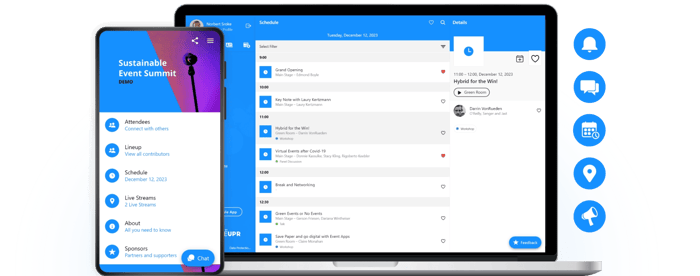
At StrategieWerkstatt, a strategy conference running on LineUpr, 150 of roughly 210 guests used the app on event day (about 71%), and 35% took part in surveys, returning 74 responses.
LineUpr isn't the right fit for every event. If you need registration, badge printing, lead retrieval, exhibitor management or a full onsite operations suite, a broader platform makes more sense. But if registration is already sorted and the goal is a branded app attendees can open in one tap, LineUpr removes the barrier that costs you the most: the download.
Build your event app free and test the access path for yourself before your next event.
FAQs
What is a good event app adoption rate?
A commonly cited range is 55-65%, with stronger events reaching 70% or more. Treat these as directional. Adoption isn't measured the same way across events. The real question is whether actual attendees can use the app for the actions that matter to yours.
Why don't attendees use event apps?
Usually one of three reasons: they couldn't get past the download or login step, they never understood what the app was for, or they opened it once and found nothing they couldn't already get elsewhere. Access friction is the most common and the most overlooked.
What features drive the most event app engagement?
The ones tied to live event needs: agenda access, session reminders, live updates, Q&A, polls, surveys, networking, meeting booking, speaker details and session resources.
How early should you promote an event mobile app?
As early as a month out if networking is involved, since attendees need time to build profiles and book meetings. Agenda-only apps can work on a shorter window, but start as soon as there's something worth doing inside.
How should organisers measure whether their app strategy is working?
Look beyond downloads. Compare actual attendees, app access, active users, engagement and drop-off points. That shows whether the issue was awareness, access, content or timing.