Event App Pricing: What It Costs and How to Budget for Your Event
August 28, 2026 · Wout Criekemans · 16 minute read
Table of Contents
- Event App Pricing at a Glance
- What Influences the Cost of an Event App?
- 1. Number of attendees per event changes pricing tiers and overage risk
- 2. Event frequency changes whether per-event or annual pricing makes sense
- 3. Required features change the package or add-ons you need
- 4. Setup and support costs depend on who does the work for each route
- 5. Native app or app-store distribution can add deployment work and membership fees
- 6. Add-ons, integrations and transaction fees can change the final budget
- Cost-reduction Strategies Before You Choose a Plan
- How to Budget by Event Type
- 1. Small VIP dinners and workshops need simple information, privacy and updates
- 2. Internal company events need agendas, communication and feedback more than ticketing
- 3. Professional conferences need capacity, multi-track schedules and engagement tools
- 4. Large or hybrid events need integrations, support and reliability planning
- Should You Build, Subscribe or Use a Self-serve Event App Builder?
- Where LineUpr Fits in the Event App Pricing Spectrum
- FAQs
Event app pricing is hard to compare because vendors aren't always pricing the same thing.
One quote may cover a custom-built mobile app while another may include a full event management platform with registration, ticketing and check-in. A third pricing structure may give you a self-serve event app builder for one event or a set number of events each year.
All of this makes it trickier to choose, and the cheapest headline price may not be the lowest cost when you account for everything else you need for the event.
To budget properly, you have to look beyond the licence fee. You need to know what it'll cost you to set up, manage and update the event app during the event. You also need to know whether your event needs a custom build, a full subscription platform or a simpler self-serve app.
This guide breaks down the main event app pricing models, the costs to factor in, and the best fit for your event type.
Event App Pricing at a Glance
Event app pricing falls into three routes:
Custom-built apps, which are software development projects you'd usually pay an agency or internal development team to build. Some event platforms also provide this as a service.
Subscription event platforms are usually part of a broader event management system where the software handles registration, ticketing, check-in and attendee-facing features. You build your app on their existing setup.
Self-serve event app builders, which give you existing event-app software that you can configure for your event.
Here's a rough estimate of how they compare:
Pricing route | Rough cost anchor | What you are paying for | Best fit | Watch out for |
Custom-built event app | According to Clutch, it's between $10,000 to $49,999. | Planning, UX, design, development, testing, deployment and sometimes, maintenance may require a retainer | Organisations with proprietary workflows, complex integrations or unusual technical requirements | Development can be expensive and slow |
Subscription event platform | Usually quote-based, per-event or annual pricing. For example, EventMobi charges $3,500/event and $7,900/year with pricing that scales by attendee count, products and add-ons. | Event app plus broader tools such as registration, ticketing, check-in, payments, event operations | Teams that need several event-management workflows in one system | Significant setup time, paying for features/workflows you don’t need; essential features may be add-ons only. For example, lead capture with EventMobi is an add-on |
Self-serve event app builder | With a solution like LineUpr, it’s as low as $215/event of 50 guests or $769 for 5 events/year with 250 total attendees. The multi-event pricing scales based on your event needs and has a 60% discount. | Existing event-app software configured by your team | Events that need an attendee-facing app for agendas, updates, information, engagement and feedback | Setup time, attendee limits, feature tiers and optional extras |
With this distinction out of the way, let's look into what changes the real cost of an event app.
What Influences the Cost of an Event App?
By the cost of an event app, we mean the full cost of setting it up and keeping it reliable for your events. If you're strapped for time, use this total-cost formula:
Real event app cost = licence or build cost + setup + attendee volume + features + deployment + add-ons + internal labour + renewal
We use this formula because a tool with a low licence fee can still require more staff time or significant add-ons to improve the attendee experience. An expensive event management software can also replace several other systems, which may make it cheaper long-term. What matters is what you need. This is what we know:
1. Number of attendees per event changes pricing tiers and overage risk
Attendee count is one of the most common pricing variables. However, before comparing quotes, check whether the tag “attendee” means registered attendees, checked-in participants, total profiles created or something else.
For example, Cvent bills its Attendee Hub add-on at $7/registrant, whether they attend or not, registration triggers the charge. Eventive counts "unique attendees" as a passholder during the event, while others have different ways of phrasing “attendee.”
To avoid surprises, ask vendors:
What counts as an attendee?
What is included in this attendee tier?
What happens if we exceed the allowance?
Can we add attendees later?
Are unused attendees carried over or lost?
2. Event frequency changes whether per-event or annual pricing makes sense
A one-off event and a recurring event programme shouldn’t use the same pricing logic. Per-event pricing is easier to justify when you only run occasional events. You pay for the event you need and avoid committing to unused annual capacity.
Annual pricing is better when your team runs several events each year. But it’s only cheaper when the event count, attendee allowance, feature scope and support level match your actual calendar.
Use this calculation: Break-even event count = annual plan price ÷ comparable per-event price
For example, if an annual plan costs €1,200 and the comparable single-event plan costs €300, the annual plan starts to make sense from the fourth event: €1,200 ÷ €300 = 4 events.
3. Required features change the package or add-ons you need
The price also changes when the event needs more than a basic agenda. A simple event, for example, a workshop, may only need a programme, speaker profiles, venue information and updates while a conference needs personal agendas, sponsor pages, Q&A, surveys, attendee networking, and analytics as part of the abilities. However, a hybrid event may need features like real-time streaming, virtual rooms or integrations with other tools.
To optimise for price, separate features into three groups before speaking to vendors:
Must-have: the event cannot work properly without it.
Useful: it improves the experience but is not essential.
Unnecessary: it adds cost without solving a real event problem.
LineUpr, for example, is a self-serve event app when you need an app to show event agenda, allow real-time updates, Q&A & other engagement abilities, and collect feedback. It’s best when you already have registration or badge-scanning handled elsewhere.
LineUpr apps can take as few as four hours to build and attendees can open it via a browser, which makes it usable across devices.
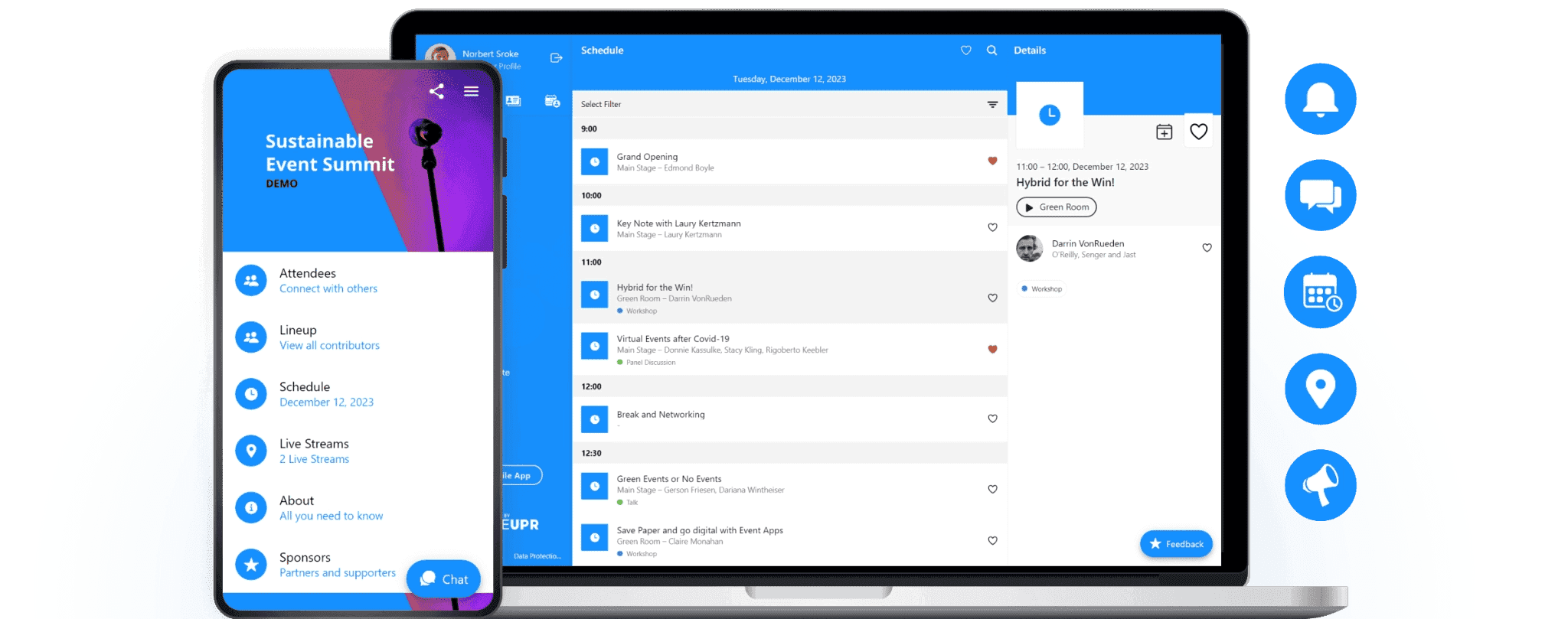
Check out this interactive app created with LineUpr to see how intuitive it is for your events.
4. Setup and support costs depend on who does the work for each route
With a custom build, setting up your event app includes discovery sessions, design, development, testing, deployment and maintenance.
With an event management app, setup includes onboarding, data import, registration configuration, integrations, staff training and support. And with a self-serve app builder, you’ll configure the app directly by adding the agenda, speakers, locations, content, branding and engagement features.
Self-serve doesn’t mean “no work,” but it does mean you shouldn’t need software developers.
You can consider the labour cost as part of the budget too, just to assess how much money and time it will cost you in total. However, keep in mind that you’ll probably spend more time setting up a custom built app and full event management tool if you don’t have a dev team to help you.
5. Native app or app-store distribution can add deployment work and membership fees
Some event apps are distributed through the App Store or Google Play. Others are browser-based and opened through a link or QR code. Some platforms offer both, so the right question isn’t simply which vendor you like, but the right distribution route for your event.
For most events, the browser-app route is better and faster because attendees can simply hit a link or scan a QR code like the below and log into the app. No need to download an app first. For an attendee experience like this, a self-serve event builder app is better.
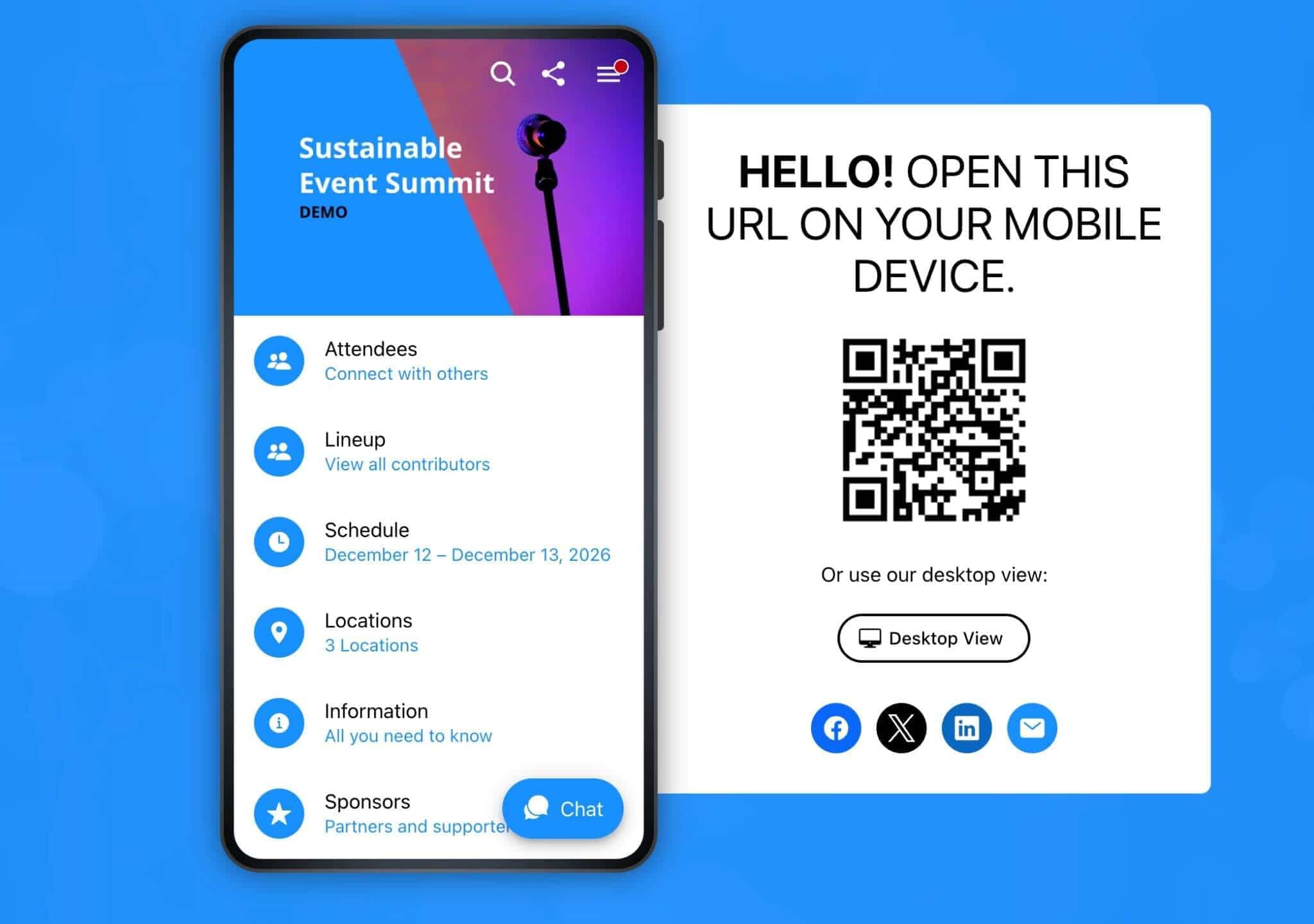
But you can choose a mobile app distribution route too, which is useful when your event needs a dedicated app-store presence, deeper device functionality or a strongly branded mobile experience. This involves creating developer accounts, store assets, review workflows, and vendor support.
For those developer accounts, Apple for App Store charges $99 annually for the Apple Developer Program while Google charges a one-time $25 for Google Play Console membership.
This is the same cost associated with branded or white-label app options. Eventee, for example, lists its white label service at $2,000-per-event add-on and says the process usually takes two to four weeks.
So, your choice determines what you pay for. If attendees mainly need the agenda, updates, information, engagement tools and feedback, browser-based access may be enough.
6. Add-ons, integrations and transaction fees can change the final budget
A starting price doesn’t always include everything your event needs. Costs can change when you add features the vendor doesn’t add to the default price tag. For example, Eventmobi treats lead capture and badge printing as add-ons, and also charges $1,000 per integration for many CRM systems. Other forms of add-ons can include networking features, custom branding, custom domain, attendee overages or on-site services.
Transaction fees are also important when registration or ticketing is part of the features offered. ClearEvent, for example, lists a service charge of 2.35% + $0.70 per registration or ticket, capped at $15.
Before choosing any event app, ask:
What is included in the headline plan?
What triggers attendee overages?
Which features are add-ons?
Are support or onboarding included?
Are integrations extra?
Are registration or payment fees separate?
Is white label or custom branding included?
Does the plan renew automatically?
What happens if our event count changes?
What staff work is required before launch?
Event app pricing becomes clearer when you know what the number includes, what it excludes and what your team still has to do.
Cost-reduction Strategies Before You Choose a Plan
The easiest way to reduce event app cost is avoid buying a bigger event stack than your events need. Start with these checks:
Separate app needs from event management needs: If registration, ticketing, payment and check-in are already handled elsewhere, don’t consider event apps with the workflows you won’t need.
Choose per-event pricing for occasional events: Annual pricing only saves money when you’ll run multiple events within the attendee count you’re paying for.
Avoid native or white-label app-store deployment unless your event needs it: A branded event app can make sense for some programmes, but it can also add publication time, developer-account requirements and white-label fees. Don’t go that route if you don’t need it.
Reuse structures for recurring events: Templates for agendas, speaker profiles, sponsors, surveys and update messages can reduce setup time even when you’re paying the same fees.
Cut features that don’t support an attendee’s job: Networking, exhibitor tools, badge scanning, lead retrieval and streaming can all be valuable, but only when the event actually needs them. If you run invite-only, B2B events, you probably don’t need them.
This way, you’ll pay for what you need that still helps attendees navigate, participate and respond during the event.
How to Budget by Event Type
The best way to budget is to start with what you want attendees to do at your event with an event app. Then remove every paid capability that doesn’t support those jobs. Here’s how to do it:
1. Small VIP dinners and workshops need simple information, privacy and updates
Small events usually need clarity, not a large event-tech stack. Budget first for:
Agenda and last-minute updates,
Location details
Host or speaker information
Private access if needed
Simple branding
Feedback collection.
Avoid paying for exhibitor tools, large-scale matchmaking, ticketing, badge scanning or complex lead retrieval unless you genuinely need them.
2. Internal company events need agendas, communication and feedback more than ticketing
Internal events often need one reliable place for employees to follow the programme, receive updates and take part in sessions. Budget first for:
Agenda structure
Speaker and session details
Internal communications
Live polls or Q&A
Feedback forms
Access control or password protection
Reusable structures for recurring events
You likely don’t need public ticketing, payment processing, or exhibitor tools for internal events. If those workflows are bundled into the platform, check whether they’re add-ons or you’d be paying for tools you won’t use. For recurring internal events, also consider apps where you can reuse prevent event structures to reduce setup time.
3. Professional conferences need capacity, multi-track schedules and engagement tools
A professional conference usually creates more pricing pressure because there are more moving parts. Budget first for apps that allows:
Multi-track agenda
Speaker and sponsor content
Personal agendas or favourites
Live updates
Polls, Q&A and feedback
Attendee networking if it supports the event goal
Analytics
Organiser support
For this event type, feature scope matters as much as attendee count. A 300-person conference with networking, sponsors and Q&A may need a higher package than a 700-person event with a simple agenda. So consider mobile event apps for conferences where the app’s job is to help attendees navigate sessions, speakers and receive real-time updates.
4. Large or hybrid events need integrations, support and reliability planning
Large, multi-day or hybrid events need more careful budgeting because complexity can increase in several directions at once. Budget for:
Attendee volume
Multi-day programme structure
Hybrid or virtual participation
Streaming or webinar requirements
Multilingual content
Sponsor or exhibitor visibility
Integrations
Security and access control
Analytics and reporting
Support before and during the event
Here’s a list of hybrid event apps to consider.
Should You Build, Subscribe or Use a Self-serve Event App Builder?
Once you understand the cost drivers, the next decision is the operating model. So, choose an app that will sync with your event structure and what your team can handle:
Choose this | When it makes sense | What you gain | What to watch |
Build custom | The event app needs proprietary workflows, complex integrations or unusual technical behaviour | Maximum control over the product | Development cost, timeline, testing and maintenance |
Subscribe to a full event management platform | The app is part of a broader event-management system with registration, ticketing, check-in or operations | One system can replace several tools | You may pay for workflows you don’t need, esp for invite-only B2B events |
Use a self-serve builder | The main requirement is an attendee-facing app, and registration or ticketing is already handled elsewhere | Faster setup by a non-technical organiser | You need to configure, test and promote the app |
GRENKE AG, a global financial services provider, faced this choice while planning its annual management conference for around 120 attendees. Michael Kimmig, Vice President at GRENKE Digital, said the cost comparison between a solution like LineUpr and an agency was “simply unbeatable.”
His advice to other organisers was to build a test app first with LineUpr, because seeing how much you can set up yourself makes it easier to judge whether an agency quote is worth paying for. For teams with similarly straightforward requirements, that's a useful way to test whether a custom build is actually necessary.
Where LineUpr Fits in the Event App Pricing Spectrum
What LineUpr is: LineUpr is a web-based event app builder that allows organisers to create customised, interactive event apps without needing any coding skills. It’s designed around a do-it-yourself workflow, so you can basically edit the app on the left and watch it render in real-time, on the right as seen below.
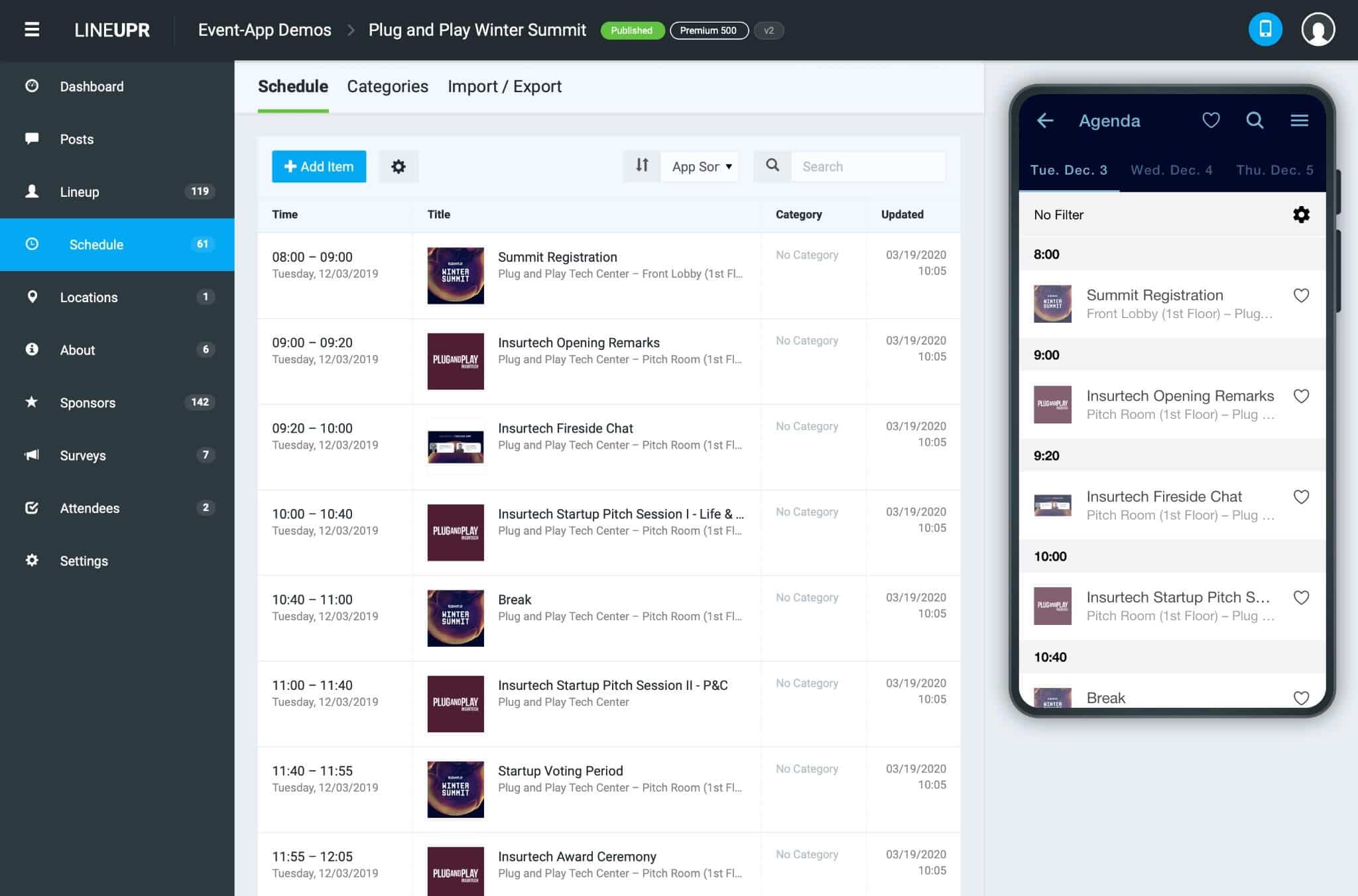
LineUpr is a good fit for small B2B event teams to manage event information, schedules, updates and engagement tools without commissioning a custom app. It’s especially useful when one or two organisers are running events alongside other duties, with limited budget, little time and no technical resources.
LineUpr is also browser-based, which means you don’t have to worry about app store listings or the common friction where attendees don’t use event apps because they don’t want to download a mobile app. Once your app is published, attendees can open it on a smartphone or laptop through the event URL.
LineUpr offers single-event and Flex pricing options to match event frequency. Organisers running single events can use single-event pricing and organisers running several events per year can use the Flex pricing to get up to 60% discount on their subscriptions. You can check the LineUpr pricing page to compare both options so you’re able to properly match the pricing model to the event programme before comparing prices.
With all these said, LineUpr doesn’t replace registration, ticketing or badge scanning features. You may need a custom built app or full event management platform for such workflows.
FAQs
How much should I budget for an event app?
Can be between $150 - $1,000 or $10,000 to $50,000 depending on the route. A custom-built app can easily cost you five-figures while a full event platform will cost less, yet include wider event-management workflows. A self-serve event app builder is the more affordable option when you mainly need an attendee-facing app. The safest approach is to calculate the full cost, not just the licence price.
What hidden event app costs should I ask about?
Ask about setup, onboarding, support, attendee overages, add-ons, custom branding, white label, integrations, data export, transaction fees, app-store deployment, renewal terms and cancellation rules. Also ask what work your team must complete before launch. Internal labour is still part of the budget.
Does an event app require App Store fees?
It depends. If you’re publishing a native mobile apps, yes, you need to pay for Apple and Google membership fees. If you’re sticking to browser-based event apps like LineUpr, you won’t pay App Store fees. Browser-based event apps are opened through a URL, which is why they’re easier to budget for.
When is an event app not worth paying for?
An event app may not be worth paying for when the event is small, simple and static. If there’s one fixed agenda, no room changes, engagement requirement or need for networking and feedback process, a simple landing page, email or printed schedule may be enough. An event app becomes more useful when attendees need to navigate information, participate, connect or respond during the event.