The 7 Top-Rated Event Engagement Apps for Non-Tech Teams & Tips To Choose
March 16, 2026 · Wout Criekemans · 26 minute read

Table of Contents
- 1. LineUpr: Best for Building Professional Event Apps Without Developers
- 2. Sched — Best for Complex Multi-Track Schedules with Speaker Submissions
- 3. Eventee — Best for Gamified Attendee Engagement and Frictionless Networking
- 4. Yapp — Best for Teams That Need a Live Event App Before End of Day
- 5. Guidebook — Best for Venue-Heavy Events Where WiFi Is Unreliable
- 6. Eventify — Best for B2B Events Where Structured Attendee Networking Is the Primary Goal
- 7. Accelevents — Best for End-to-End Onsite Event Operations
- Run Your Next Event Faster, With More Attendees, and Stay Within Budget
- 4 Tips For Choosing The Right Event Engagement App
If you run a few events a year without a dedicated tech team, most event engagement apps you’ll find today won’t help you launch events faster, engage attendees without friction, or scale your operation.
Not because they don’t work. The problem is that many of the popular event apps you’d find are built for enterprise teams sold downmarket to everyone else.
As a result:
They require a complex setup for tools you probably don’t need. The builder has more configuration options than you need, the setup assumes someone who does this full time, and by the time you've worked through it, you've spent more hours on the tool than on the event itself.
They require downloads and limit attendee adoption. You send the link, some people download the app, most don't bother. You arrive on the day to find the people who needed it most — the ones who didn't read the email — asking you for a printed schedule.
You’d probably end up paying for features you don’t need. Most engagement apps bundle features built for events with thousands of attendees, full exhibitor programs, and dedicated operations teams. If your event has 200 people and two sponsors, you're paying for features you don’t need.
The only event apps that work for small non-technical teams are those with three characteristics:
A setup one person can finish before the week is out,
An access model attendees will actually use on the day, and
A pricing structure that reflects the events you're actually running — not the ones you're not.
Below, we review 7 event engagement apps that meet those needs, starting with LineUpr, our event app, and the only tool on this list that helps you deliver professional event apps under $200/event.
Tool | Pricing | Best For | Key Downside |
LineUpr | $179–$489/event; Flex Subscription saves up to 60% | Small organisations that need an easey-to-use event app without breaking the budget. | Limited pre-event management features. E.g, It has no option for venue management |
Sched | $600–$3,900/year (unlimited events) | Complex multi-track schedules with built-in Call for Papers | Thin engagement features at base plan; check-in process is clunky |
Eventee | $1,499/event or $2,999–$4,999/year | Gamified engagement and frictionless swipe-based networking | Starts at $1,499/event — highest single-event cost on this list |
Yapp | ~$399–$499/year (flat, unlimited attendees) | Teams that need a live event app in under 30 minutes | No live polls, Q&A, or attendee-to-attendee messaging |
Guidebook | Small Event plan + Engage plans (demo required for exact pricing) | Venue-heavy events at locations with unreliable WiFi | App download required; subscription model less suited to single events |
Eventify | From $249 (400 attendee credits); scales by volume | B2B events where structured tag-based networking is the primary goal | 80% price increase in 2025 drew user backlash; thin review base |
Accelevents | Custom pricing (contact sales); ~$1/registrant per third-party sources | End-to-end onsite operations: registration, check-in, badges, and app in one system | Pricing not published — requires sales conversation; hardware kit is a separate cost |
1. LineUpr: Best for Building Professional Event Apps Without Developers
LineUpr is an event engagement app that helps non-technical event teams build a fully branded, interactive event app, and get attendees actually using it on the day, without a developer, a lengthy setup process, or a pricing model built for events ten times the size of yours.
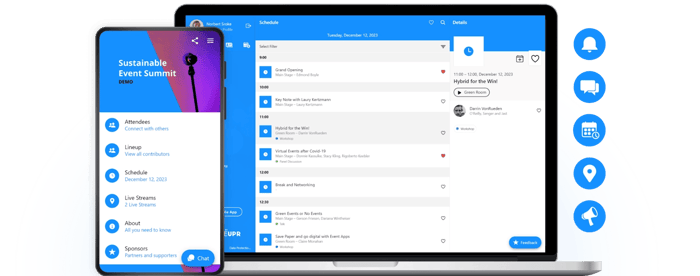
Instead of bundling features your events don't need into a platform your team can't manage, LineUpr gives you a self-service app anyone on your whole team can run, that attendees open from a QR code or link, at a price that reflects the events you're actually running.
Why We Chose LineUpr [and How it Works]
Three things consistently sink event app adoption for non-technical teams: setup that takes longer than one person can manage, attendees who never make it past the access step, and pricing built for an operation bigger than yours.
LineUpr is the only event app on this list that addresses all three, for less than $200/event. Here’s how it works:
Set up a fully branded event app in hours
Instead of navigating several complex screens, you can build and publish your full event app from one screen in LineUpr's App Manager. It uses a clean and ease-to-use interface with a live preview that shows exactly what attendees will see before you go live, you can add agenda, speakers, locations, sponsors, maps, and engagement features in hours.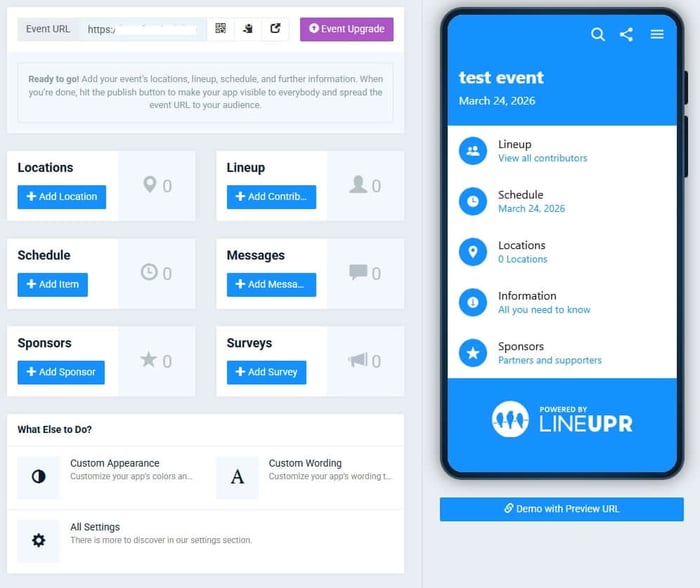
After that, you can import your agenda, speakers, and session data via CSV or Excel instead of entering everything manually. This is useful when you're working from a registration spreadsheet you already have. No need to replace it. 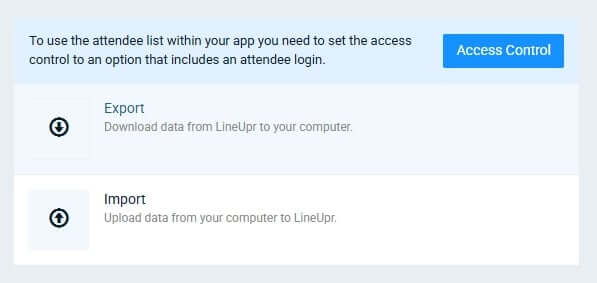
Drive more event signups faster and boost attendee engagements without forcing downloads
Most event attendees fail to complete signup between receiving the link and opening the app. Password setup, a failed OTP, an Email login that never came in, etc. These minor stop-gaps account for most drop-offs. For a small, non-technical team, that drop-off happens before you're in the room to fix it.
With LineUpr, you don’t have to worry about that. Your event app would run as a progressive web app. Which means attendees don’t need to download anything. You simply send them a link, they open it from a QR code or URL and they're already inside.
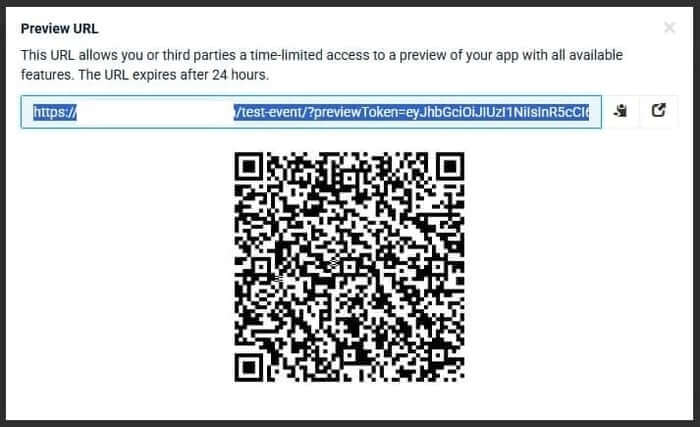
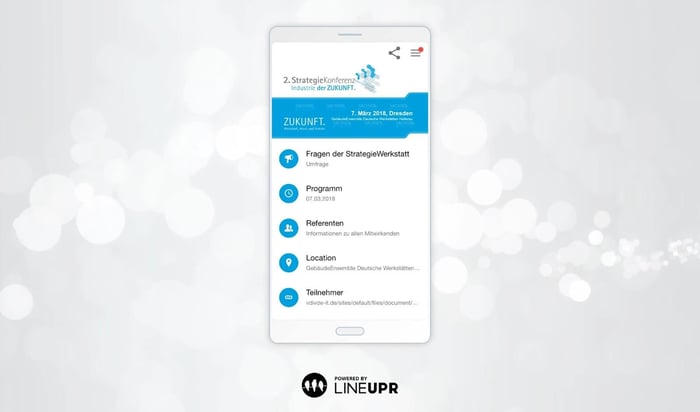
From there, attendees can:
- Browse the full event agenda and build a personal schedule by bookmarking the sessions they want to attend, so they're not scrolling through the full programme every time they want to know what's next
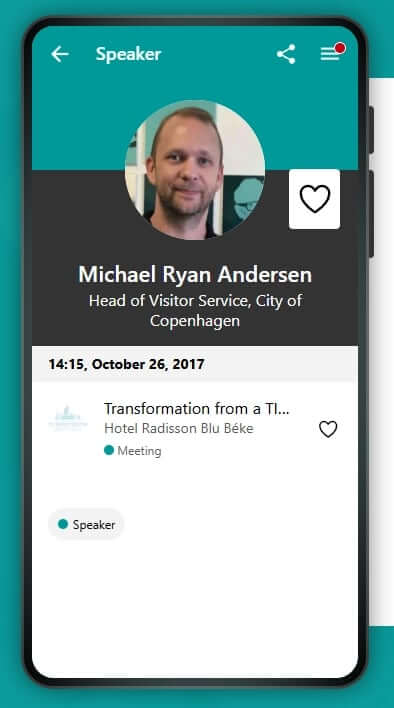
Access speaker profiles, bios, and session details in one place — including social links and contact information — so they arrive at sessions with context rather than reading a name badge for the first time
Submit questions during sessions and upvote the ones they want answered, so the Q&A reflects what the room actually wants to discuss, not just whoever gets to the mic first
Respond to live polls in real time and see results displayed on screen as they come in — useful for session feedback, group decisions, or keeping energy up in longer sessions
Receive push notifications about schedule changes, session reminders, or organizer announcements — even when the app isn't open in their browser
Once the app has loaded once, the content is stored offline. That way, schedule changes, speaker bios, and venue maps stay available even when the WiFi doesn't.
Pay for what you actually need, per event and scale your operation with the right budget
LineUpr prices per event, by the features and attendee count you actually need. There are no annual contracts, no per-seat fees, and no bundles assembled for operations bigger than yours. The free tier lets you build and preview the full app before spending anything — so you're not committing to a tool you haven't tested.
Michael Kimmig, VP at GRENKE, put the value gap directly after his first build: “Just try it and see how far you can come in an hour. Astoundingly, you then realize how expensive an agency wants to sell such an app."
LineUpr's pricing works as follows:
Free tier to build and preview your complete event app before paying anything — no credit card required, no time limit on building
Plus plan from $179/event — covers the core features most events need: agenda, speaker profiles, location and maps, sponsor listings, in-app messaging, and basic branding
Premium plan from $239/event — adds live polls, Q&A with upvoting, session surveys, attendee feedback, and full white-labelling
Platinum plan from $489/event — adds attendee networking, in-app chat, digital contact cards, and the Appointments add-on for structured one-to-one meeting slots
Flex Subscription brings the per-event cost down by up to 60% for teams running multiple events — still with no annual contract and no per-seat fees.
Want to see how it works? Start for free today! You can build the entire app for free and preview it with you team before paying anything.
Key Features
Offline access
Event agenda management.
Pros
- Transparent, per-event pricing with no annual commitment required
- A suitable for internal events
Free tier to build and test before paying. No credit card needed
Zero download friction drives significantly higher attendee adoption rates
Fully self-service. No developer, agency, or IT dependency
Real-time updates mean your agenda is never outdated
GDPR-compliant, hosted on German servers, with a strong data privacy posture
Highly rated support team (G2: 4.9, Capterra: 4.9)
Cons
Advanced analytics are limited to external tools via Google Analytics/Matomo integration
Registration, ticketing, and badge printing work via integration with tools that handle these.
Pricing
LineUpr costs between €149 and €449 per event, depending on features, with a free tier to build and preview before spending anything.
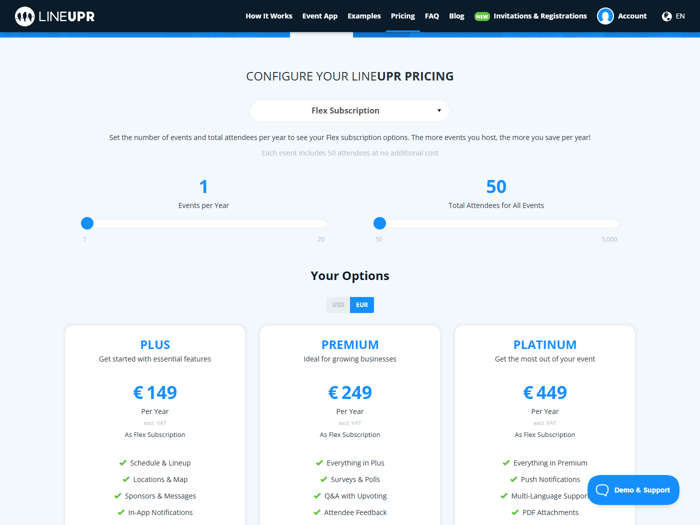
The Flex Subscription brings the per-event cost down by up to 60% for teams running multiple events without annual contracts or per-seat fees.
Try LineUpr for free and build your complete event app before committing.
2. Sched — Best for Complex Multi-Track Schedules with Speaker Submissions
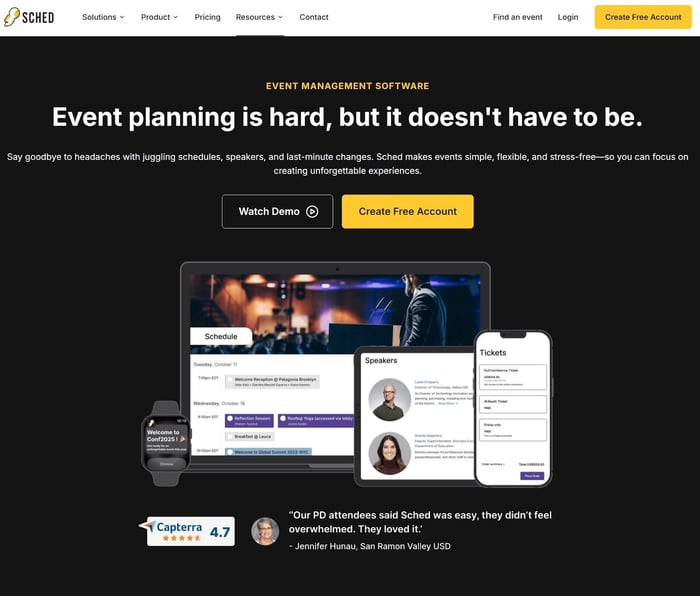
Sched is a schedule-first event platform that helps you manage complex multi-track agendas, speaker submission workflows, and attendee navigation from a single flat-rate annual plan without per-attendee fees or hidden tier costs. The trade-off is in engagement depth: interaction features are thinner than those of most other tools on this list.
Why We Chose Sched
If your conference curates content through submissions — call for papers, abstracts, panel proposals — you already know the hidden cost isn't building the agenda. It's managing two systems simultaneously: one for collecting and reviewing submissions, another for publishing approved sessions to attendees. Two data entry processes, two sets of deadlines, and coordination overhead right when your team is already at capacity.
Sched is the only tool on this list that eliminates that problem. The submission form, committee review, scoring, and acceptance workflow all happen inside the same platform where you build the schedule. Approved sessions flow directly into the agenda — no copying titles, bios, and time slots between tools the night before the event.
Pricing is flat and transparent, starting at $600/year for unlimited events up to 250 attendees — no per-attendee fees, no surprises. A 30-day free trial requires no credit card.
The honest boundary: if live interaction or gamified participation is your primary goal, other tools on this list serve that better.
Key Features
Drag-and-drop multi-track schedule builder
Built-in Call for Papers with committee review and scoring tools
Personalized attendee schedule builder
Speaker and sponsor profile management
QR code check-in and attendance tracking
Registration and ticketing
Real-time push notifications and organizer announcements
Branded mobile app (available on higher plans)
Offline-capable app access
Attendee networking tools (higher plans)
Analytics and post-event reporting
CSV/Excel import for bulk schedule data
Pros
Transparent, flat-rate pricing where one price covers the full event regardless of attendee count
Only tool on this list with a native Call for Papers and committee review workflow
Nonprofit and education discounts are publicly available
Cons
The check-in process is the most consistently cited friction point. Multiple reviewers describe it as clunky; test this before your event day
Engagement features are limited at the base plan level without live polls, Q&A, or gamification without upgrading
A branded native mobile app is an upgrade, not an entry-level inclusion
Some users report that pricing increased meaningfully in recent years, which caught nonprofit teams by surprise
Primarily a schedule-logistics tool. If attendee interaction and engagement is the priority, this list has better options
Pricing
Sched starts at $600/year for the base plan—unlimited events with up to 250 attendees, no per-attendee fees. The mid-tier is $1,500/year with enhanced registration, networking tools, and sponsor profiles; the top plan is $3,900/year with priority support.
All plans cover unlimited events annually, so the value improves fast for multi-event teams. Nonprofit and education discounts are available on request.
3. Eventee — Best for Gamified Attendee Engagement and Frictionless Networking
Eventee is an event engagement app that helps you turn passive audiences into active participants through swipe-based attendee matching and gamified engagement mechanics without requiring technical setup or developer involvement.
Why We Chose Eventee
Eventee makes it easy for event organizers to engage more with attendees. Attendees see a curated shortlist and choose to connect or pass; the system then continues to surface new matches throughout the event, which dramatically lowers the activation energy.
Gamification is also included with every paid plan and is not locked behind an enterprise tier. Organizers can award points for session check-ins, poll responses, and networking actions, then use leaderboards to reinforce participation without manually chasing people.
The trade-off is price. For events where networking and participation are core values, Eventee justifies the $1,499 price. If your primary need is a clean digital programme, other tools here cost far less.
Key Features
Swipe-based attendee matching and networking
Gamification; points, leaderboards, and engagement challenges on all paid plans
Live polls, Q&A, and session surveys
Personalized agenda builder
Push notifications on all plans
Sponsor and exhibitor profiles
Interactive maps
Speaker profiles and bios
Real-time schedule updates
Engagement analytics
Browser-based access and mobile app (dual access path)
Pros
Most frictionless networking mechanic on this list as it is recommendation-based, not directory-based
Gamification is included at the entry plan level, not as an enterprise add-on
Two access paths: via a browser and an app to reduce attendee adoption friction
Independently rated 'Easiest Event App' by industry reviewers
Clean, modern design consistently praised in reviews
Unlimited free trial — build and preview before paying
Reviewers on G2 rate Eventee at 4.8, with Capterra scores averaging around 4.7
Cons
$1,499 per event is the highest single-event price on this list — a significant barrier for teams with tight per-event budgets
Annual plans better suit multi-event teams; single-event buyers pay the full per-event rate
Smaller review base than more established platforms — harder to assess edge-case reliability
Virtual and hybrid add-on pricing not transparent — requires contact
Engagement features are strong, but only reach attendees who download the app or open the browser link; adoption still requires an intentional communication plan
Pricing
Eventee's Solo plan is $1,499 per event for up to 500 attendees. The Business plan is $2,999/year for up to 6 events (1,000 attendees each); Enterprise is $4,999/year for up to 12 events (3,000 attendees each).
For teams running one event per year, the Solo rate is the relevant number—and at $1,499, it sits well above most alternatives here. An unlimited free trial lets you build the complete app before committing to anything.
4. Yapp — Best for Teams That Need a Live Event App Before End of Day
Yapp is an event app builder that helps you publish a fully branded, mobile-accessible event app in 30 minutes or less. It covers everything attendees need on the day: agenda, speaker bios, venue maps, sponsor listings, social feed, and push notifications without coding, IT involvement, or a sales conversation.
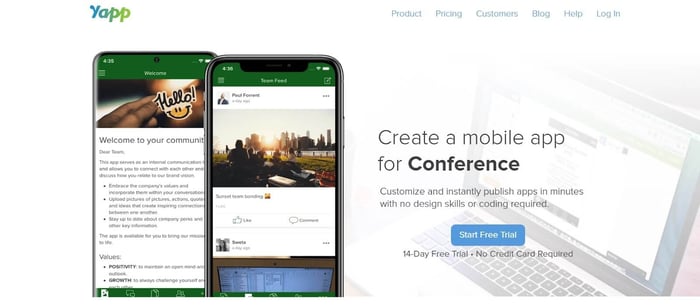
The trade-off is that since Yapp is a digital programme first, it won't cover live polls, Q&A, or direct attendee-to-attendee messaging.
Why We Chose Yapp
Sometimes the constraint isn't capability — it's setup time. You have an event in 48 hours, the printed programme is already wrong, and one afternoon to fix it. A feature-rich platform makes that a time sink.
In that case, Yapp is the right fit. Yapp has the fastest verified setup-to-publish time on this list. Multiple independent reviewers confirm 30 minutes or less, from a builder consistently described as "like PowerPoint."
You drag and drop content blocks, upload schedules via CSV, and publish instantly without waiting for app store approval. Changes go live in under 30 seconds via Yapp's container app model—meaning you can fix a speaker change while walking to the room.
Key Features
Drag-and-drop app builder — no coding required
Instant publish via container app model (no app store review delay)
Full event agenda with real-time updates in under 30 seconds
Speaker bios and profiles
Venue maps and floor plans
Push notifications and organizer announcements
In-app social feed with photo sharing
Sponsor and exhibitor listings
Document library
CSV/Excel import for schedule data
Offline access — content available without WiFi
Pros
Fastest verified setup-to-publish on this list independently confirmed at 30 minutes or less
Flat annual pricing with unlimited attendees without per-head fees
All features included at one price no tiered lockouts
Real human support (no chatbots) are praised for fast response times across Capterra, G2, and Software Advice
Offline content access
14-day free trial, no credit card required
Trusted by enterprise teams and small nonprofits with equally strong reviews
G2: 4.7, Capterra: 4.5
Cons
Requires app store download. One explicitly flagged that the download process confused attendees
No live polls or Q&A. Yapp is a digital programme tool, not an engagement engine
No direct attendee-to-attendee messaging. Multiple reviewers cite this as the feature most likely to push them toward a different tool
Social feed is available but limited to shared posts — no structured networking or matchmaking
Interface design is described as slightly dated in recent reviews
Not suitable for hybrid or virtual event formats
Pricing
Yapp starts at approximately $399/year as a flat annual subscription with all features included, no tiers, no per-attendee fees.
For teams running one event per year, that's effectively a per-event cost of ~$399; for multi-event teams, the per-event cost drops further. A 14-day free trial is available with no credit card required.
5. Guidebook — Best for Venue-Heavy Events Where WiFi Is Unreliable
Guidebook is an event engagement app that helps you deliver a fully branded, interactive event experience; floor plans, schedules, speaker profiles, and engagement tools that keeps working even when the venue WiFi doesn't.
Two constraints matter upfront: it requires a native app download, and its annual subscription model fits multi-event teams better than single-event buyers.
Why We Chose Guidebook
Guidebook is the only tool on this list built around offline-first architecture. Attendees download the app in advance, and 80%+ of content — floor plans, session details, speaker bios, exhibitor info — is available locally on their device. When the WiFi dies, the app still works.
There's also a practical adoption advantage: Guidebook is used by over 100,000 organizations across universities, associations, and government bodies. For audiences that attend professional conferences regularly, there's a good chance they've used it before — which reduces the hesitation that usually comes with a download requirement. One organizer described achieving "near-ubiquitous adoption" at their conference.
The honest trade-off is commercial structure. The subscription model amortizes best when you run multiple events. If you run events every other year, the Gap Year subscription helps — but you're still making an annual-style commitment on top of accepting the download barrier.
Key Features
Drag-and-drop no-code app builder
Branded iOS and Android native app
Web version available alongside mobile app
Push notifications and group messaging
Live polls, surveys, and social feed
Session scheduling with personalized agendas
Attendee meeting scheduling (Calendly integration)
Lead capture for exhibitors and sponsors
QR code deep-link access
Gamification and scoring
Real-time analytics and reporting
CSV import for bulk content
Multi-admin access with unlimited editors and updates
Updates are published within 60 seconds
Pros
Best offline experience on this list. 80%+ content available without WiFi, verified as a core product feature
Trusted by 100,000+ organizations across associations, universities, government, and enterprise
One-price model with multiple users explicitly contrasting this with competitors that 'snowball' costs through add-ons
97% of customers are fully self-service — no developer or IT involvement needed
Updates live within 60 seconds
Nonprofit discount available (10%)
Biennial/Gap Year subscription available for organizations with every-other-year events
Reviewers on G2 rate Guidebook at 4.6, with Capterra scores sitting at 4.7
Cons
Native app download required. Attendees must install from the App Store or Google Play
The annual subscription model is less suited to single-event buyers; the per-event cost is higher when amortized over one event than over three or four. If either of these constraints rules it out, our guidebook alternative comparison covers tools better suited to infrequent use.
Pricing requires a demo request or quote inquiry, so it's not a fully self-serve checkout and this adds friction for teams that want a number before talking to anyone
Schedule navigation can feel clunky on complex multi-day agendas with large session counts
Primarily built for and dominant in North American markets, European teams should verify GDPR data residency before committing
Pricing
Guidebook offers a Small Event plan for events under 200 attendees, with Engage plans scaling upward for larger events and richer feature sets.
All plans follow an all-inclusive model with no per-feature add-ons, and annual, multi-year, and Gap Year subscriptions are available. Nonprofits receive a 10% discount. Current exact pricing requires a demo request — factor that step into your evaluation timeline. If you'd rather evaluate options without a sales conversation, our guidebook alternative breakdown covers tools with transparent published pricing.
6. Eventify — Best for B2B Events Where Structured Attendee Networking Is the Primary Goal
Eventify is an event engagement platform that helps you connect attendees, speakers, and exhibitors based on shared interests—before the first session starts—without requiring manual matchmaking or a dedicated networking facilitator.
Why We Chose Eventify
Most platforms stop at attendee-to-attendee networking. Eventify extends matchmaking simultaneously across attendees, speakers, and exhibitors — which matters most at sponsor-driven B2B events where the commercial relationships are as important as the professional ones.
The problem it solves is a familiar one: at most B2B conferences, the primary reason people pay to attend is to meet the right people. But default tools — printed lists, name badges, app directories — put the burden entirely on attendees. Relevant connections stay invisible, and the event's value becomes luck-dependent.
Eventify's tag-based matchmaking changes that. During registration, attendees select up to 20 interest tags. The algorithm then matches them with other attendees, speakers, and exhibitors whose tags overlap — delivering a curated shortlist, not a directory of everyone. Those conversations can begin via chat and meeting scheduling before the event opens.
Two trade-offs are worth flagging upfront: an 80% price increase in 2025 means historical pricing data is unreliable — verify current rates before committing. And a thinner review base means less evidence of edge-case reliability at scale.
Key Features
Tag-based AI matchmaking — attendees select up to 20 interest tags; matched with other attendees, speakers, and exhibitors
Pre-event chat and meeting scheduling
Community forum and private social network
Gamification — points, badges, and leaderboards on paid plans
Live polls, Q&A, and session surveys
Branded mobile app and web app access
Ticketing and registration
Badge printing and attendee check-in
Interactive floor and booth map
Exhibitor and sponsor profiles with sponsored placement
Session management with hybrid and virtual support
API access and Zoom integration
Pros
Most systematized networking mechanism at this price — simultaneous matching across attendees, speakers, and exhibitors
Community forum extends engagement between events and after event day
Gamification included on paid plans
Intuitive interface — users report minimal training required for organizers and attendees
One client reduced setup time from 3 weeks to 1 week after switching to Eventify
No ticket commission beyond payment gateway fees
Both mobile app and browser access available
Cons
80% price increase in 2025 drew explicit user backlash on G2 — at least one reviewer stated they would not renew; pricing stability cannot be assumed
Thinner review base than most tools on this list — fewer data points for assessing reliability at scale
Customization options can be limited for complex branding requirements
Review skews toward smaller events — limited evidence of performance with 1,000+ attendees
Some advanced features require additional setup time for larger events
Pricing
Eventify plans start at $249 for 400 attendee credits and scale by volume and feature requirements. There is no commission on ticket sales beyond the payment gateway fee. Anyone using older comparison articles should verify current rates directly—pricing increased 80% in 2025 and historical figures are unreliable.
7. Accelevents — Best for End-to-End Onsite Event Operations
Accelevents is an event operations platform that helps you run the full front-door experience: registration, check-in, on-demand badge printing, and a mobile event app—as one integrated system with 24/7 live support that responds in under 27 seconds.
The main constraint is immediate: pricing isn't published, so you need a sales conversation before you can access any number.
Why We Chose Accelevents
If you've lived through the pre-printed badge nightmare, you already know how the morning goes. The line forms, and every edge case shows up at once: misspelled names, last-minute registrants missing from the list, no-shows whose badges sit in a stack while the right person waits. You spend the first 45 minutes solving a problem created by the workflow itself.
Accelevents eliminates it. Your registration data flows directly into check-in and badge printing without exports, imports, or manual sync steps. You print badges on demand as attendees arrive — only for people who show up, with current data. One reviewer described the before-and-after plainly: pre-printed badges made check-in "a nightmare"; Accelevents completely streamlined it.
The support commitment is the other reason it makes this list. You get 24/7 chat with sub-27-second average response times — reviews back this up, with one user noting they "rarely wait longer than 60 seconds." When you're onsite and something breaks, that responsiveness is the difference between a quick fix and a reputation problem.
The trade-off is scope and buying friction. This is the most operationally complete platform on this list — over-built if you only need an engagement app — and pricing opacity means you'll need a sales conversation before you can access any number.
Key Features
Native integration of registration, check-in, and badge printing
Onsite Kit — pre-configured hardware (iPads, printers, badge stock, router) delivered to venue
On-demand badge printing at check-in kiosks
Mobile event app included on all plans
Custom registration forms with conditional logic and approval workflows
Sponsor management with revenue tracking
CRM integrations — HubSpot, Salesforce, Pardot, Marketo natively
Zapier and API access
Pros
This is the only tool on this list that ships a pre-configured hardware kit for on-site badge printing
Registration, check-in, and badge printing operate as a single natively integrated system without manual data syncing
24/7 live support with verified sub-27-second response times, the strongest support commitment on this list
Strong CRM integrations for teams with existing marketing and sales infrastructure
Accessible for non-technical users — consistently described as easy to pick up for people for whom event planning is not their full-time role
Continuous product improvement is actively incorporated based on user feedback
Reviewers on both G2 and Capterra rate Accelevents at 4.7.
Cons
Pricing is not published — requires a sales conversation before you can access any number; this is a direct barrier for budget-conscious teams
The Onsite Kit hardware is a separate cost from the platform subscription — factor this into the total cost of ownership for physical events
Platform scope positions this closer to enterprise event operations than to lightweight engagement tools — teams who only need a mobile event app may find it over-built
Badge printing quality reported to degrade when printing from a PC — multiple reviews flag significantly degraded output
Virtual event features are a paid add-on, not included in base plans
Analytics dashboard accuracy was flagged as a work-in-progress in recent reviews
Pricing
Accelevents does not publish pricing; their website instructs you to contact the team to explore plans. Third-party sources reference pricing around $1 per registrant with tiered options, but these figures cannot be verified without a sales conversation.
The Onsite Kit hardware carries a separate cost from the platform. A free trial is the most efficient first step before committing to the sales process.
Run Your Next Event Faster, With More Attendees, and Stay Within Budget
Every tool on this list solves a real problem for a specific type of buyer.
Sched is the right call if your event runs on submitted content and multi-track scheduling.
Eventee earns its price if networking and gamified participation are the primary outcomes.
Accelevents makes sense if onsite operations — registration, check-in, badge printing — need to run as one integrated system.
But if you run a few events a year without a dedicated tech team, and your primary constraints are setup time, attendee adoption, and a budget that has to make sense before you enter a sales conversation, LineUpr is the tool built for that situation.
You can have the full app live before the week is out. Attendees open it from a QR code and they're already inside. And you pay per event, for the features you actually need, with nothing bundled for a conference you're not running.
If that sounds like the right fit, you can build your complete event app for free! No credit card, no sales call, no commitment until you're ready to go live.
4 Tips For Choosing The Right Event Engagement App
Choosing an event engagement app gets a lot easier when you stop comparing feature checklists and start comparing what will actually work with your team, your audience, and your reality on event day. Four considerations make that easier:
1. Have an attendee adoption plan before you buy
No app creates engagement just by existing. You'll need a plan for how you'll introduce it before the event, prompt usage during sessions, and reinforce it at key moments. Pick a tool that makes executing that plan easy, not one that assumes attendees will hunt it down.
2. Start lightweight and scale when you hit a limit
The instinct to buy the most feature-packed platform upfront is what leads teams to end up with the $5,000 app nobody uses. Start with the core job you need done and move upmarket only when your events truly outgrow your first choice.
3. Don't dismiss an option based on cost alone
Be realistic about what you actually need. A mobile-friendly website can deliver an agenda at a low cost. But if you're running a 300-person conference that needs real-time floor plans, session feedback, and live Q&A, you're buying an experience layer, not a page with times on it. The right question is whether the tool is right-sized for your event.
4. Choose based on adoption, not the feature count
An app with 40 features that 20% of attendees open is worth less than a simple tool 80% of attendees use. Before evaluating any platform, ask how attendees access it and whether that creates friction or removes it.